Thursday, 5 November 2015

How to watch movie with subtitles in VLC player (subtitles according your movie audio ).

How to watch movie with subtitles in VLC player  (subtitles according  your movie audio ).

1  go to site  http://www.videolan.org/vlc/    and Download  VLC Player.

2. Install  VLC Player  Set-up .

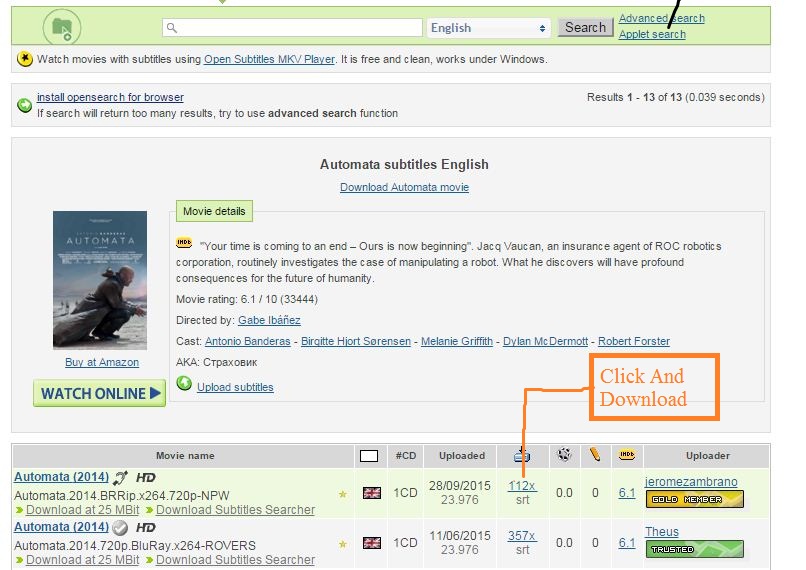
3. Play Movie you want subtitles. Note down movie name  example :  (Movie name Automata ) 

4. go to Site  http://www.opensubtitles.org/en/search    and Click register  and after that login .


            Register 


           Login


5. Find  your movie  subtitles  according your audio.


6. Download   subtitles  file.


7. Drag  and drop subtitles file in VLC Player .


8.done …


 Video tutorial 


Sunday, 11 October 2015

How to Hide many Browser Tabs with In One click (few seconds depend your internet speed ) In Chrome .

 How to Hide many Browser Tabs with In One click (few      seconds depend your internet speed )  In Chrome .

You  visit any web site your favourite website  someone walks up behind you while you’re looking at something you don’t want them to see.
What  should you do in situation .


For  User Who  using Chrome  there’s an addon  called  PANIC BUTTON  . this addon install your browser And one click hide your many tabs .

Follow  step

Step 1
Cleck here Open your  Browser  


Step 2
See   “Apps”  option  and  Click here


Step 3
See  “web Store” and click here


Step 4
See search space and  type “panic button” and press  Enter


Step 5
Select  Add-on and   click “ADD TO CHROME” 


Step 6
Just open  pop up window and Click  “Add extension”


Step 7
See RED BUTTON and Click


Step 8
Automatically open new window and find “set  a safe option”


Step 9
Click  and set  “custom page “  and type any web site name   (my favorite site my blog http://www.hackingismylifesam.blogspot.com ).


Step 10
Open new tab  and type  website name (secret site ).I type  My secret web site  www.youtube.com  .  anybody Come just click red button.


Step 11
Automatically open another site  (you set step 9) .  red button change green button  and if press green button you go Your previous  site.


Step 12
Done .  


Video tutorial 


Tuesday, 11 August 2015

Kali Linux 2.0 Release


Kali Linux 2.0 Release


                          Video


.


Kali Linux Images

·         Kali Linux 64 bit
·         Kali Linux 32 bit
·         Kali 2.0 for ARM architecture
                                                             Download 


Kali Linux VMware and VirtualBox images


                                                  Click here download 


Friday, 31 July 2015

FREE OF COST Ethical Hacking Tutorial And Penetration Testing AND Hacking Forensics Tutorial

FREE OF COST Ethical Hacking Tutorial And Penetration Testing AND Hacking Forensics Tutorial


                             Ethical Hacking Tutorial


Wednesday, 22 July 2015

How to Unblock Websites at School, Collage ,Office Home or Anywhere

How to Unblock Websites at School, Collage ,Office  Home or Anywhere

Which websites are most commonly Blocked?
 The most Popular blocked websites include websites Songs site , movie site Social websites that are often blocked include Twitter, Facebook, MySpace, Bebo, Flickr, Hulu, LinkedIn, Yahoo! Messenger, Typepad, eBay, WikiLeaks, Digg, Reddit, Technorati, StumbleUpon, Delicious, Wikipedia, YouTube, DMOZ ,google pulse  Etc.

Access Blocked Websites at School, College ,Office ,Home or Anywhere
There are many genuine reasons for which you might visit blocked websites at your school or office. Given below are the many ways you can use to regain access to the blocked website you wish to visit.

1. Cache: Many search engines maintain a cache of web pages indexed by them. You can search for a website on Google , Yahoo! or Bing and click on the cached link that is given next to the result. To load the web pages more quickly, you can visit the text-only version.


2. Using Google Mobile Search: Google Mobile Search acts as a proxy which you can use easily. It removes all the CSS styling and JavaScript and presents a stripped down version of the web page to the user from it's own server.

Example -   www.facebook.com


         m.facebook.com    


3. To access a blocked website, you can enter the IP address instead of the URL in your browser's address bar. This can bypass most basic forms of website blocks. Although if the blocking software maps the IP address to the website domain, the website will still remain blocked. You can find the IP address of the website by pinging the website domain name in command prompt and noting its IP address.
 Step 

a.       Win +R open run box  and type  cmd press enter.


b.      Open black screen window first type  ping  www.yoursite.com and press enter .


c.       See IP address  [ IP address in box ] and copy  this IP address .

d.       Past this IP address  on your browser  in url place  and press enter .


 4.Access Blocked Websites using  Google Translate or Yahoo! Babelfish. You can also use translational services to get on blocked websites. To do so, enter a language different from the website in the 'From' field and English in the "To" field. You can also use this method to bypass software that block websites on the basis of specific keyword mentions. Just translate the URL you wish to visit in a different language to overcome the keyword block.


5. IP Hiding Software: Sometimes, websites block users on a particular IP address from visiting themselves. In such cases, free IP hiding software like UltraSurf can be used to visit.


6. Use IP Address to Decimal Conversion: If you cannot access blocked websites, you can enter the decimal equivalent of the URL's IP address to get access to restricted websites. Search Google for IP to Decimal + IP Address of the banned website and Google will convert it into decimal. Enter that into your browser's address bar and see if the blocked website open  and last convert IP address to binary Enter that into your browser's address bar and see if the blocked website open


7. TOR
TOR or The Onion Router is a free software that protects the privacy and security of its users by channeling data through multiple nodes so as to prevent the orginal data from being unscrambled. Although browsing through TOR is a bit slow, it is one of the most effective ways of bypassing restricted websites.



8. VPN Software: VPN or Virtual Private Network Software can be described as a tunnel under the public network that offers more anonymity than proxy websites as it also encrypts the data transferred by the blocked website thus, offering complete anonymity when you access your favorite web applications. Although most VPN software are available as paid software only, 
HotSpotShield is a popular free alternative and another
Best  VPN  Software “Vpnbook” .


9. 
 Proxy Websites: There are many proxy websites (anonymizers) and hide my ip Ass which open blocked websites on their servers and present the data to you. This hides from the service providers the address of the website you are trying to visit.

Friday, 17 July 2015

HOW TO SEARCH DIRECT DOWNLOAD LINK OF ANY MOVIE BY ADVANCE GOOGLE SEARCHING TRICK.


How to SEARCH  Direct Download Link Of Any Movie by  advance google searching  trick.


 The Advance  google search trick that you can use to get your favorite movie very easily over the internet. There will be no need to browse out lots of sites and then searching  the direct downloading link of movie with wasting lots of time. So proceed with the below simple steps.

Steps
Step 1:First of  launch the web browser in your Computer/Laptop.

Step 2:Now type the name of movie that you want to download and after name copy and paste the below code along with the movie name.-


Movie Name -inurl:(htm|html|php|pls|txt) intitle:index.of “last modified” (mp4|wma|aac|avi)

Example:
The amazing spiderman -inurl:(htm|html|php|pls|txt) intitle:index.of “last modified” (mp4|wma|aac|avi)

Step 3:Now you will get the google result and you can browse out either first or second result and you will get the direct download link of the movie.


Download and enjoy.


So above is the way for searching  Direct Download Link Of Any MovieBest and easy way to get your favorite movie over the internet without searching out in lots of sites and wasting your  time. Also this method will work for music too by replacing mp4 with mp3 in the line above. Hope you like this Advance  google searching trick, 


Friday, 26 June 2015

How To Add New Feature Recycle Bin On Android Device

How To Add New Feature Recycle Bin On Android Device

With the recycle bin feature in you android device you can now easily make your data secure by securing it by getting deleted by any other person too. And the method is very easy and is just based on a simple android app that will temporary store deleted files that you can restore. Just follow up the below steps to proceed.


1. First of all download and install Dumpster app from here
2. Now when you open the app there will be long agreement displayed, either waste      your lots of time to read those or simply click on agree and proceed.
3.Now in the next step select the media which you want to store in the app which gets deleted from your storage.
4.Now this app is ready to store all the data that is being deleted in your android device.
5.Note that if you android is rooted that you can give superuser access to this app for better working of this app.
.